
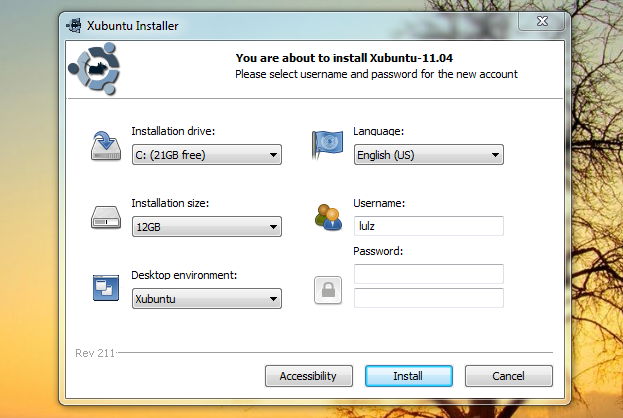
If you have only ever used Windows, the thought of installing Linux could be quite scary. And one of the reasons why Microsoft still dominates the operating system market is because people are afraid of trying out new OSes. However, with the aim of getting 200 millions users for Ubuntu by 2015, Canonical has developed Wubi, a very useful tool to help Windows users install Ubuntu with ease. Wubi allows people with very basic computer skills to explore Linux safely and conveniently. And here are the pros and cons of using Wubi in my opinion.
Wubi is a very useful tool for Windows users with only basic computer skills because of its convenience. No need to burn a CD or create an installing-USB, you just need to download Wubi from the Ubuntu hompage then just install Ubuntu like any other windows application. The package is very light (1.5 MB) and the configuration is really easy to understand. Wubi will download Ubuntu and install it into your machine. The process is just similar to how you install Adobe Flash into Firefox. And if you dont like using Ubuntu anymore, you can easily uninstall it through the Windows control panel.
Another benefit of using Wubi is that it’s totally safe. New Linux users always love to tinker around and customize their system, but because of insufficient knowledge, they can make many mistakes that can result in catastrophes. But with Wubi, Ubuntu is installed as a virtual machine so it’s totally safe to mess around your Ubuntu system as you want. If something bad happens, just uninstall Wubi and your data and Windows will still remain untouched. And if you have read my post about dangerous Linux commands and are wondering how cool these commands can be, just try them on Ubuntu installed by Wubi.
Though Wubi is really cool and useful, it still has some disadvantages. First of all, because Wubi installs Ubuntu as a virtual machine, your Ubuntu wont perform as fast as it can when you install it as a dedicated OS. The difference in speed will be quite noticeable if your hardware is old.
Second, when Wubi installs Ubuntu in a specific windows partition ( c:\ or d:\ ..) you wont be able to access the data stored in this partition when using Ubuntu.
Third, you wont be able to try out the cool stuffs of Grub2. In other words, you cannot create the Batman boot screen like I did in the video below when using Wubi because Wubi still uses Windows as the bootloader.
And last but not least, because Wubi is an application for Windows, anything happens to Windows can effect your Ubuntu as well. That means if Windows is infected with viruses, your Ubuntu installed by Wubi could be broken. Moreover, disk fragmentation is another problem to face. Because when using Wubi, Ubuntu is installed inside a Windows partition so disk fragmentation can effect the Ubuntu image too. So if you dont defrag your hard disc frequently, your Ubuntu will run slower over time.
If you have visited my blog frequently and are curious about Linux, I recommend you to use Wubi to try out Ubuntu – the most popular Linux distro nowadays. It’s very convenient and totally safe for your data and windows. And when you got enough knowledge and experience, you then can install Linux as a dedicated OS and got all the fun of the wonderful Linux operating system.